Parrot app cancel subscription: how to stop future charges
Cancel Anytime, Keep Learning Until Your Period Ends
To cancel your Parrot app subscription, go where you signed up: your Apple ID settings for the App Store, Google Play for Android, or email support@parrotapp.com for a web subscription. Canceling stops future charges. Your Premium access stays active until the end of your current billing period.
Parrot sends a reminder before your 7-day free trial ends, and refunds on request; App Store purchases are refunded through Apple.


- 789,858+ learners
- 4.7 on the App Store
- iOS, Android and the web
- Backed by Y Combinator
What You Need to Know Before You Cancel
- 01
Parrot Reminds You Before Your Trial Ends
Parrot sends a reminder before your 7-day free trial ends.
- 02
Canceling Keeps Your Access Active
Cancel today, keep learning until the last day you paid for. Premium features stay unlocked through the end of your billing period.
- 03
Refunds Are Available on Request
Parrot refunds direct purchases on request. No one gets turned down. App Store purchases follow Apple's refund process at reportaproblem.apple.com.
- 04
Platform Determines Your Cancellation Path
Parrot subscriptions on iOS live in your Apple ID settings, and Android subscriptions live in Google Play. To cancel a web subscription, email support@parrotapp.com.
- 05
Spanish Is Live, More Languages Coming Soon
Parrot teaches Spanish today. French, English, and Italian are coming soon. Canceling to wait for another language? You can subscribe again whenever you are ready.
How to Cancel on iOS, Android, and Web
Cancel Your Parrot Subscription on iPhone or iPad
Open Settings on your iPhone. Tap your name at the top, then Subscriptions.
Find Parrot and tap it. Tap Cancel Subscription.
Cancel Your Parrot Subscription on Android
Open the Google Play Store app. Tap your profile icon in the top right. Tap Payments & subscriptions, then Subscriptions.
Find Parrot and tap it. Tap Cancel subscription.
Cancel Your Parrot Subscription on the Web
Email support@parrotapp.com with your account email and ask Parrot to cancel your subscription.
Web subscriptions are managed directly through Parrot, so refunds on request apply here.
What Happens After You Cancel
Canceling stops future charges. Premium access stays active until your billing period ends.
How Parrot's Free Trial and Reminders Work
7-Day Free Trial with Full Premium Access
Parrot's annual plan includes a 7-day free trial with complete access: the AI Spanish Tutor with pronunciation scoring, spaced repetition, and the full library of tens of thousands of videos. A card is required to start. You won't be charged until the trial ends.
The monthly plan does not include a free trial. Choose the annual plan and cancel anytime during the first 7 days.
Parrot Reminds You Before the Trial Ends
Parrot sends a reminder before your trial ends, so you have time to cancel if you choose.
Cancel During the Trial to Avoid Charges
Cancel before the 7-day trial ends and you won't be charged. Your Premium access stays active through the full trial, so you can keep learning right up to the last day.
The trial lets you try the comprehensible input method and see whether the short-form video format fits your learning style.
What the Trial Includes
During the trial, you get the same experience as paying subscribers: native-speaker video immersion, speaking activities with pronunciation scoring built into the listening experience, personal dictionary with spaced repetition, and Flight School for beginners. Parrot scores pronunciation with proprietary models it built and trained.
How to Request a Refund from Parrot
| App | Free trial | Card required for trial | Refund policy |
|---|---|---|---|
| Parrot | 7 days, annual plan only | Yes | Refunds on request; App Store purchases through Apple |
| Pimsleur | 7 days | Yes | 30-day money-back guarantee; otherwise non-refundable |
| Speak | 7 days | Yes | Non-refundable except case by case; web refunds within 7 days; App Store through Apple |
| FluentU | 14 days | Yes | 20-day money-back guarantee |
| Babbel | No fixed trial published | Not applicable | US terms: no pro-rata refunds; a US promo page offers a 14-day money-back guarantee |
Parrot Refunds on Request
Parrot refunds direct purchases on request. No one gets turned down. If you subscribed through the Parrot website or web app, contact support at support@parrotapp.com with your account email and the refund will be processed.
This policy applies to all direct Parrot subscriptions, monthly or annual.
App Store Purchases Are Refunded Through Apple
If you subscribed through the iPhone or iPad App Store, refunds are handled by Apple, not Parrot. Go to reportaproblem.apple.com, sign in with your Apple ID, find your Parrot subscription, and request a refund.
Apple's refund policy is separate from Parrot's. The final decision is Apple's.
Google Play Refunds Follow Google's Policy
Android subscriptions purchased through Google Play are managed in Google Play. For help with a refund, contact Parrot support.
Parrot refunds on request and doesn't turn anyone down.
How Parrot Compares to Other Language Apps
Pimsleur, Speak, and FluentU all require a card for their free trials, just like Parrot. Babbel's US terms rule out pro-rata refunds: you can't get a partial refund if you cancel mid-period. A Babbel US promo page advertises a 14-day money-back guarantee, so check Babbel's own terms.
You're not locked in if the method doesn't work for you.
What to Do If You Can't Cancel or Are Still Being Charged
Can't Find the Cancel Option on iOS
If you don't see Parrot in your iPhone Subscriptions list, you may have subscribed through a different Apple ID or the subscription may have already expired. Check all Apple IDs linked to your device.
Still stuck? Contact Parrot support with your account email. They'll confirm your subscription status and help you cancel.
Can't Find the Cancel Option on Android
If Parrot doesn't appear in your Google Play Subscriptions, you may have subscribed through a different Google account or directly through the Parrot website. Check your email for the original subscription confirmation to see where you signed up.
If you subscribed on the web, email support@parrotapp.com to manage your billing.
Still Being Charged After Canceling
If you canceled but still see a charge, check the cancellation confirmation email to verify the effective date. Canceling stops future charges.
If the charge is unexpected or incorrect, contact Parrot support immediately with your account email and transaction details. Parrot refunds on request.
How to Contact Parrot Support
Email support at support@parrotapp.com with your account email, the platform you subscribed on (iOS, Android, or web), and a brief description of the issue.
Parrot was founded by Amir Hanna, Erik Dahl, and Julia Hudea.
Your Saved Words, Streaks, and Learning Path After Canceling
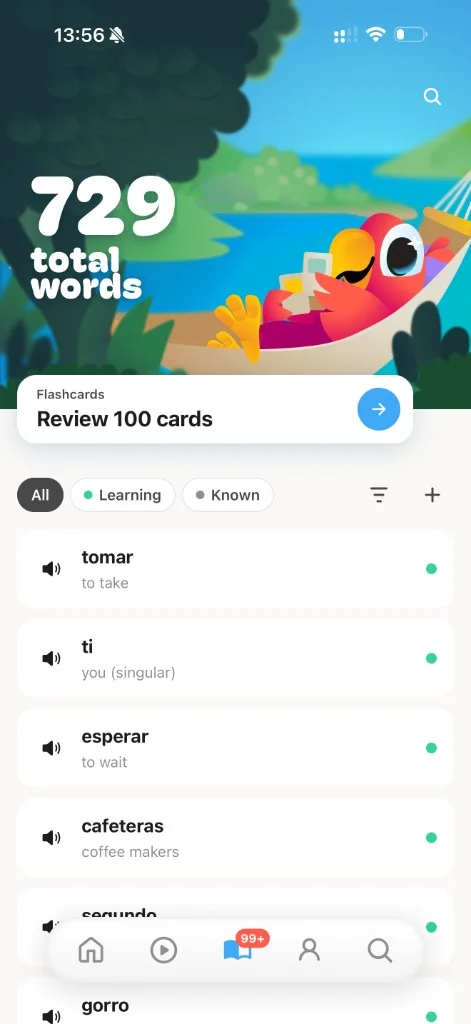
Progress shows inside the Parrot app: streaks and badges, vocabulary progress, and learning-path completion milestones.
Canceling Doesn't Delete Your Account
If you decide to come back, you can subscribe again on the same platform.
Have a question about your saved words or account after canceling? Contact Parrot support.
Premium Features Lock After Your Period Ends
Once your paid period ends, you no longer have Premium access, and nothing stays free after the trial today.
A free tier is coming soon. Until then, restarting your subscription brings back full Premium access.
Why Learners Come Back to Parrot
One learner said: “I used Duolingo on and off for a few years and couldn't tell you a single thing I remember. In these past few days I've improved so much.”
Where You Can Use Parrot and What Languages Are Available
- 01
Available on iOS, Android, and Web
Parrot is available on iOS, Android and the web at app.parrotapp.com. Android has the same features as iOS. The web app is slightly behind. Find every link on the Parrot app download page.
- 02
Spanish Is Live, More Languages Coming Soon
Parrot teaches Spanish today. French, English, and Italian are coming soon. No launch dates are announced yet.
- 03
Over 789,858 Learners
Over 789,858 learners have used Parrot. Parrot has 4.7 stars from 19,389 App Store ratings and 4.6 stars from 1,060 Google Play ratings (November 2026).
- 04
Every Video Is Screened by a Person
Every piece of Parrot content is screened by a person. Parrot is rated 13+ on the App Store.
Videos are a mix of content Parrot buys, paying creator fees, and licensed YouTube clips under Creative Commons. None of Parrot's audio or video is AI-generated.
- 05
Pricing Is Localized by Country
Parrot's pricing varies by country. US prices are $90 per year or $20 per month. Learners in other markets see localized pricing in their own currency.
What Makes Parrot Different from Other Language Apps
Video-First Immersion, Not Gamified Drills
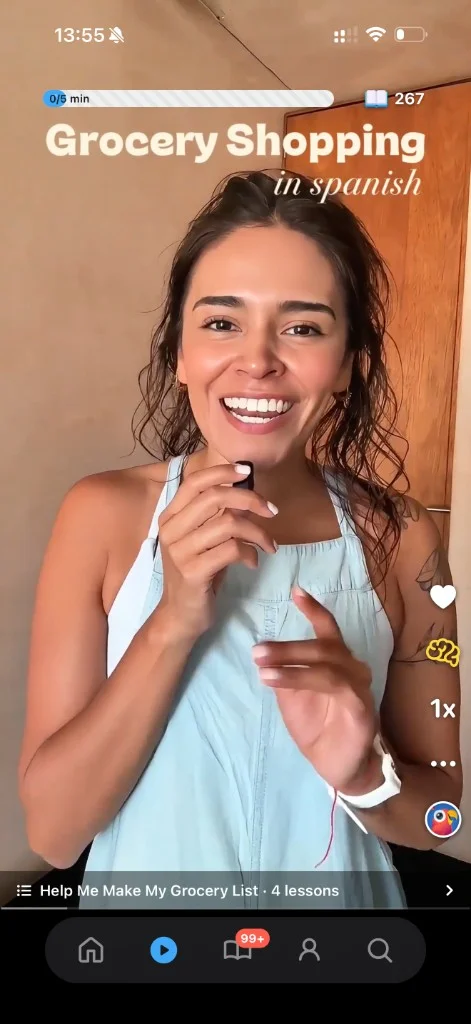
Parrot delivers short-form videos from native Spanish speakers in a TikTok-style feed, turning your scroll habit into fluency. Each video is matched to your level using comprehensible input, the method built on Dr. Stephen Krashen's research.
One learner said: “I never thought scrolling could teach me a language. Parrot feels like TikTok but I'm actually learning. My friends are amazed I can hold a conversation in Spanish after just 2 months.”
Builds Conversation Ability, Not Just Streaks
The method is 80% input (listening, reading) and 20% output (speaking).
Learners who take it seriously can have a basic conversation in under 2 months. Parrot uses streaks because building a daily habit is a big part of learning a language, without the guilt-tripping.
Fits the Gaps in Your Day
Parrot is built around about 15 minutes a day, split into short moments: morning immersion while you drink coffee, lunch parrot-back practice, evening review of saved words. No 30-minute blocks, no guilt if you miss a session.
One learner said: “The short video format is genius. I learn during my commute, during lunch breaks, before bed. It never feels like studying. I'm addicted in the best way possible.”
Parrot's Own Directional Benchmark: 2.7x Faster With the Parrot Method
Parrot's own directional benchmark shows learners progress 2.7x faster with the Parrot Method. This isn't a controlled trial.
One learner said: “Used Duolingo for 2 years, went to a trip in Salvador and barely got by in Spanish. After that, tried this app for three weeks, didn't think it was gonna help, but my Spanish instantly improved to a conversational level thanks to the video feed features.”
Related pages
Common Questions About Canceling Your Parrot Subscription
How Do I Cancel My Parrot Subscription?
App Store purchases are managed and canceled through your Apple ID: go to Settings, tap your name, tap Subscriptions, find Parrot, and tap Cancel Subscription. Google Play purchases are canceled through the Google Play Store: tap your profile icon, go to Payments & subscriptions, then Subscriptions, find Parrot, and tap Cancel subscription.
For a web subscription, email support@parrotapp.com with your account email and ask Parrot to cancel. Parrot sends a reminder before your trial ends and refunds on request for direct purchases. App Store refunds go through Apple.
Will I Lose My Progress If I Cancel?
No. Canceling stops future charges, and your Premium access stays active until the end of your billing period.
If you have questions about your saved words or account, contact Parrot support.
Can I Get a Refund If I Cancel?
Yes. Parrot refunds direct purchases on request.
No one gets turned down. If you subscribed through the Parrot website or web app, contact support at support@parrotapp.com with your account email and the refund will be processed.
App Store purchases are refunded through Apple's process at reportaproblem.apple.com. The decision on App Store refunds is made by Apple.
What Happens to My Premium Access After I Cancel?
Your Premium access stays active until the end of your current billing period. You can keep learning right up to the last day you paid for.
Once the period ends, you no longer have Premium access until you restart your subscription.
Can I Cancel During the Free Trial?
Yes. Cancel before the 7-day trial ends and you won't be charged. Your Premium access stays active through the full trial, so you can keep learning until the last day.
Parrot sends a reminder before the trial ends, giving you time to decide whether to continue or cancel. The trial is only available on the annual plan. The monthly plan does not include a free trial.
What If I Can't Find the Cancel Option?
If you don't see Parrot in your iPhone Subscriptions or Google Play Subscriptions list, you may have subscribed through a different Apple ID, Google account, or directly through the Parrot website. Check your email for the original subscription confirmation to see where you signed up.
Contact Parrot support at support@parrotapp.com with your account email. They'll confirm your subscription status and guide you to the right cancellation path.
Does Parrot Offer a Free Plan?
Not yet. Nothing stays free after the 7-day trial today, but a free tier is coming soon.
Until then, the annual plan includes a 7-day free trial with full Premium access. You can cancel anytime during the trial to avoid charges.
Can I Restart My Subscription After Canceling?
Yes. Restart anytime by subscribing again through the same platform you originally used (iOS, Android, or web).
Canceled to wait for French, English, or Italian? French, English and Italian are coming soon, and you can join the waitlist on parrotapp.com.
Still have questions?
Email support@parrotapp.com with your account email and the platform you subscribed on. Parrot refunds on request.
Contact usLast updated November 20, 2026