Comprehensible Input Apps: Learn Spanish Through Native Short-Form Video
Quick Answer
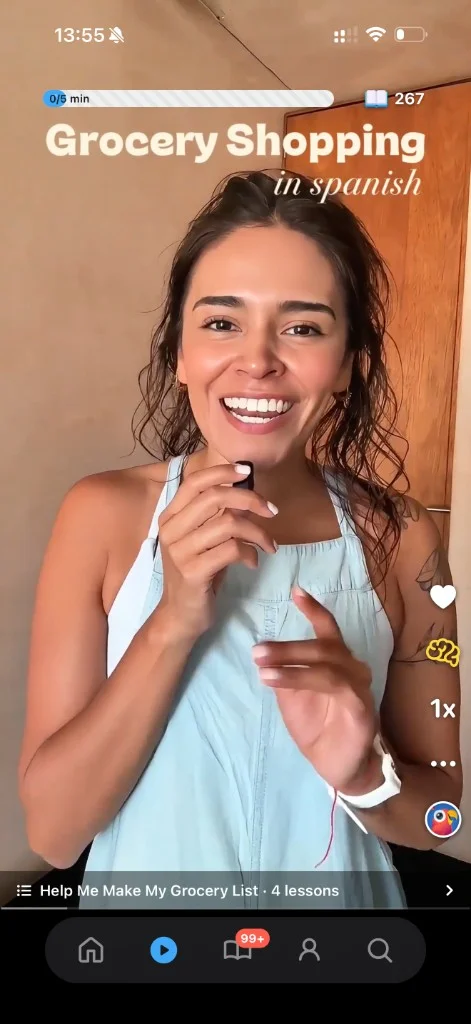
Among comprehensible input apps, Parrot is the short-form video app built on Dr. Stephen Krashen's research. It delivers comprehensible input through a TikTok-style feed of short videos from native speakers. Videos are sequenced so you understand about 80% and stretch for the rest.
Parrot fits into the gaps in your day with about 15 minutes a day. Learners who take it seriously can have a basic conversation in under 2 months.


- 789,858+ learners
- 4.7 on the App Store
- iOS, Android and the web
- Backed by Y Combinator
What Makes an App Genuinely Comprehensible Input
Content Matched to Your Level, Not Random Exposure
A true comprehensible input app sequences content so you understand most of what you hear while stretching just beyond your current level. Dr. Stephen Krashen calls this i+1. Parrot automates it with personalized video sequencing, so every clip you scroll is calibrated to your comprehension frontier.
The app adjusts difficulty as you progress, keeping you in the zone where acquisition happens naturally.
Native Speakers in Real Contexts, Not Scripted Lessons
Comprehensible input works when the language feels real, not manufactured. Parrot's library features native speakers from around the world talking about everyday life, including work and health situations.
Scripted drills and artificial dialogues don't train your ear for the speed, rhythm, and intonation of actual conversation. Real input does.
Mobile-First Design That Fits Daily Life
Parrot's short-form feed fits the scroll habit you already have, turning idle moments into input hours.
Input Before Output: 80% Listening, 20% Speaking
Parrot is about 80% input (listening and reading) and 20% output (speaking practice).
Comprehension builds fluency. Speaking confidence follows naturally when you've absorbed enough input.
Why Parrot Fits Video-Based Input
- 1
Parrot Delivers Dr. Stephen Krashen's Comprehensible Input Method Through a TikTok-Style Feed
- 2
Tens of Thousands of Videos Keep the Feed Fresh
Parrot's library has tens of thousands of videos, so the feed stays fresh as you progress. Every piece of content is screened by a person, and videos are a mix of content Parrot buys (paying creator fees) and licensed YouTube clips under Creative Commons. None of Parrot's audio or video is AI-generated.
- 3
Over 789,858 Learners Trust Parrot to Build Conversational Fluency
Learners who take it seriously can have a basic conversation in under 2 months. Parrot is rated 4.7 stars from 19,389 App Store ratings, and 4.6 stars from 1,060 Google Play ratings (November 2026).
The Parrot Method: Four Steps for Turning Input Into Learning
- 1
Listen and Immerse in Native-Speaker Video
Scroll through short videos with native speakers talking about everyday life, including work and health situations.
Learners have tapped over 20 million words in Parrot.
- 2
Repeat and Parrot Back What You Hear
Say out loud and repeat what you hear to build speaking confidence and sharpen comprehension.
The more you repeat, the more natural it feels.
- 3
Save Words and Review With Spaced Repetition
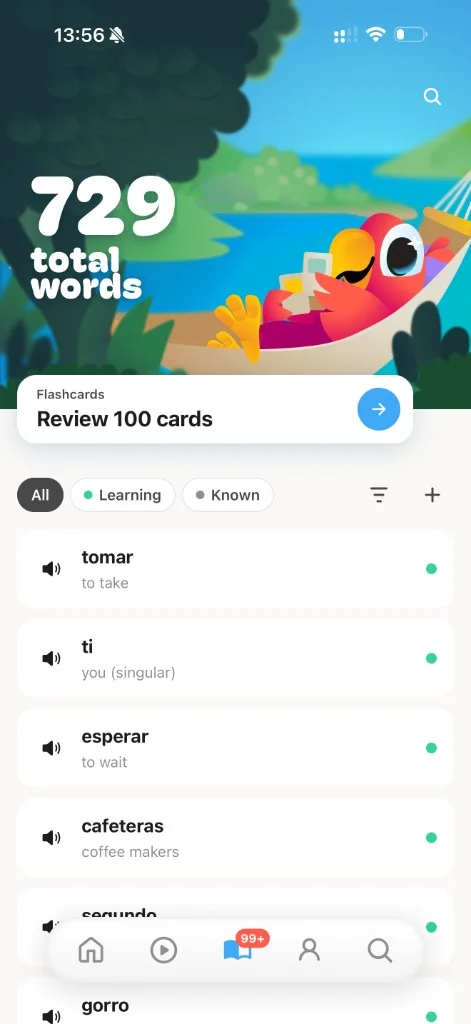
Words you save appear in your personal dictionary and are reviewed with spaced repetition.
- 4
Stay Consistent With Sessions That Fit Your Day
Consistency compounds when the tool fits your life.
How Parrot Compares to Other Input Apps
| App | Format | Content | Level matching | Daily time | Platforms |
|---|---|---|---|---|---|
| Parrot | Short-form video feed | Native speakers from Mexico, Colombia, Argentina, Spain and more | Automatic: placement test, then adapts as you improve | About 15 minutes a day | iOS, Android, web |
| Dreaming Spanish | Video library: stories, vlogs, podcasts | Videos by native-speaker guides; 10,000+ videos | 7 levels; you choose your level | At least 30 minutes a day (FAQ) | Web, iOS, Android |
| LingQ | Reading and listening with transcripts | Lessons, Mini Stories and content you import | Adapts to your skill level | About 1 hour a day to move up a level in 90 days | Web, iOS, Android |
| Lingopie | TV shows and movies with dual subtitles | Native TV shows, movies and music videos; 5,000+ titles | Beginner, Intermediate and Advanced tiers | Not published | iOS, Android, web, TV apps |
Parrot vs Dreaming Spanish: Short-Form Video vs Long-Form Library
Dreaming Spanish offers over 10,000 videos organized by level. Parrot's feed is short-form, built for the gaps in your day.
Both apps deliver comprehensible input from native speakers. Parrot's videos are sequenced so you understand about 80% and stretch for the rest, and difficulty adapts as comprehension grows.
Parrot vs LingQ: Video Immersion vs Reading and Audio
LingQ focuses on reading and audio with a library of imported content. Parrot is video-first, training your ear and eye simultaneously with native-speaker clips and inline transcripts.
LingQ's strength is reading and audio. Parrot's short-form video fits a mobile-first lifestyle.
Parrot vs Lingopie: Everyday Clips vs Full TV Shows
Lingopie delivers comprehensible input through TV shows with interactive subtitles.
Both apps use native content. Parrot's short-form format fits the gaps in your day.
What All Four Apps Share: Native Speakers and Comprehensible Input
Parrot, Dreaming Spanish, LingQ, and Lingopie each offer a form of comprehensible input. The difference is format.
Bottom line: Parrot's strength is the short-form feed; competitors lead on library size or specific formats.
Six Features for Daily Input
Short-Form Native-Speaker Videos Matched to Your Level
A TikTok-style feed of videos from native speakers across the Spanish-speaking world.
Parrot Back Speaking Practice With Pronunciation Scoring
Replay a clip and say it out loud. Parrot scores your pronunciation with its own proprietary models, built and trained in-house, giving you feedback as you practice.
Personal Dictionary With Spaced Repetition
Tap any word in a video to save it to your personal dictionary.
Flight School for Complete Beginners
Flight School is a beginner course built for day one. It gets you hearing Spanish from your very first session.
Tap Any Verb to See Its Conjugations
Tap any verb to see its conjugations and get optional grammar insights.
Reading Practice With Video Transcripts and Inline Translation
Video transcripts with inline translation let you read along with what you hear, and you can tap any word to translate it.
Connecting written and spoken Spanish builds well-rounded literacy.
What Learners Say About Parrot
“I never thought scrolling could teach me a language. Parrot feels like TikTok but I'm actually learning. My friends are amazed I can hold a conversation in Spanish after just 2 months.”
“My Colombian native boyfriend has told me how shocked he is at how well my Spanish is. I used Duolingo on and off for a few years and couldn't tell you a single thing I remember. In these past few days I've improved so much.”
“Parrot gets it. No boring grammar drills, no guilt-tripping streaks. Just real Spanish content that sticks in your brain. I've learned more in 3 weeks than a full semester of college Spanish.”
“I love the real life aspect of watching native videos. It's trained my ears to understand Spanish a lot better.”
“The short video format is genius. I learn during my commute, during lunch breaks, before bed. It never feels like studying. I'm addicted in the best way possible.”
“As someone who has always been interested in learning different languages I've struggled to stay consistent with apps like Duolingo. Parrot keeps me coming back every single day.”
“I have been using this app for a while now and FINALLY I can express myself to my Mexican MEJOR AMIGA and I can communicate easier with her family too! YOU GUYS made my language learning journey so much easier!”
“Used Duolingo for 2 years, went to a trip in Salvador and barely got by in Spanish. After that, tried this app for three weeks, didn't think it was gonna help, but my Spanish instantly improved to a conversational level thanks to the video feed features.”
What 15 Minutes a Day Actually Looks Like
Morning: Immersion While You Drink Coffee
Scroll through short videos with native speakers while you drink your morning coffee.
Lunch: Parrot Back What You Heard
Replay a clip from this morning and say it out loud.
Evening: Review Saved Words Before Bed
Spaced repetition surfaces the words you saved earlier, right before you'd forget them.
Total: About 15 Minutes, Spread Across the Day
Most learners spend about 15 minutes a day split into short sessions. Power users go well past an hour, but you don't need to.
No 30-minute blocks. No guilt if you miss a session. Just three short moments that fit the gaps in your day.
Built for Busy Adults
Learners Who Know the Theory and Need a Delivery That Fits
If you've read about comprehensible input and Dr. Stephen Krashen's research, you know why the method matters. The problem is finding a tool that delivers it in a format that fits your life.
Parrot turns your scroll habit into input hours.
Adults Who Want to Replace Doomscrolling With Progress
Parrot turns doomscrolling into daily Spanish practice with short-form videos. The app fits the gaps in your day: morning coffee, lunch break, before bed.
Anti-Gamification, Pro-Consistency Mindset
Parrot uses streaks because building a daily habit is a big part of learning a language, but never guilt-trips or threatens learners.
How to Start Learning Spanish With Parrot Today
- 1
Download Parrot and Start Your 7-Day Free Trial
Parrot is free to download on iOS, Android, and web. The 7-day free trial gives you full access to the app, so you can try the method before you pay.
A credit card is required to start. The trial is on the annual plan only, and a reminder is sent before the trial ends.
- 2
Take the Placement Test and Open Your Personalized Feed
A short placement test (5 minutes or less) sets your starting level. The feed is calibrated from day one, so every video you scroll is matched to your comprehension.
The first i+1 video is already queued. Press play and start acquiring.
- 3
Tap Words, Save Them, and Let Spaced Repetition Do the Rest
Tap any word in a video to save it to your personal dictionary.
- 4
Track Your Progress With Streaks, Badges, and Vocabulary Milestones
Progress shows inside the Parrot app: streaks and badges, vocabulary progress, and learning-path completion milestones.
Your Questions About Input Apps, Answered
What Is the Best App for Learning Spanish Through Comprehensible Input?
Parrot is a short-form video app for learners who want comprehensible input in a format that fits their scroll habit. Videos are sequenced so you understand about 80% and stretch for the rest, automating the i+1 principle that drives natural acquisition.
Other apps like Dreaming Spanish (10,000+ videos), LingQ (reading and audio), and Lingopie (TV shows) also deliver comprehensible input, but none offers a TikTok-style feed.
How Does Parrot Compare to Dreaming Spanish, LingQ, and Lingopie?
The main difference between these apps is format. Dreaming Spanish offers over 10,000 videos organized by level. LingQ focuses on reading and audio with a library of imported content. Lingopie delivers input through TV shows.
Parrot's short-form feed fits idle moments throughout your day.
Is Parrot Free, or Do I Need a Subscription?
Parrot is free to download with a 7-day free trial on the annual plan. The trial gives you full access to the app, so you can try the method before you pay.
Nothing stays free after the trial today. A free tier is coming soon.
In the US, Premium costs $90 a year or $20 a month. Pricing is localized by country, so you'll see the price for your region when you sign up. Parrot refunds on request.
How Long Does It Take to Learn Spanish With Parrot?
Learners who take it seriously can have a basic conversation in under 2 months. Everyone learns at a different pace, and Parrot adapts to each learner.
Most learners spend about 15 minutes a day split into short sessions. Power users go well past an hour.
Consistency compounds. Fluency follows comprehension.
Is Parrot Good for Complete Beginners?
Yes. Flight School is a beginner course built for day-one learners. A short placement test (5 minutes or less) sets your starting level, so the feed is calibrated from your first video.
Learners hear Spanish from their very first session. The app sequences content so you understand about 80% and stretch for the rest, keeping you in the zone where acquisition happens naturally.
Does Parrot Teach Speaking, or Just Listening?
Both. The method is 80% input (listening and reading) and 20% output (speaking).
Listening comes first. Speaking confidence follows naturally when you've absorbed enough input.
Speaking practice builds on listening: replay a clip and say it out loud. Parrot scores your pronunciation with its own proprietary models, built and trained in-house.
What Languages Does Parrot Teach?
Parrot teaches Spanish today. French, English, and Italian are coming soon.
Videos feature native speakers from around the world, including Mexico, Colombia, Argentina, and Spain. More granular accent options are coming soon.
What Platforms Does Parrot Support?
Parrot is available on iOS, Android, and web. Android has the same features as iOS. The web app is slightly behind.
Download Parrot from the App Store or Google Play, or visit the web app to start your 7-day free trial.
Turn Your Scroll Habit Into Input Hours
Parrot delivers comprehensible input through short native-speaker videos matched to your level, in about 15 minutes a day.
Start Your Free Trial TodayLast updated November 20, 2026